O.R.E.O.s

Excel, Lessons, News, Projects, Roanoke County Schools No Comments »

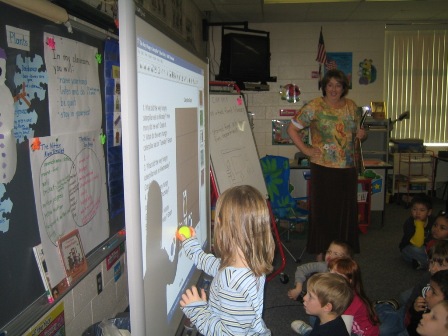
First Grade classes around the county participated in an O.R.E.O. project, including Mrs. Chapman’s class, Mrs. Williams’ class, Mrs. Braun’s class,  and all of Oak Grove’s First Grade!   It was tons of fun, and it all centered around cookies!!

Students stacked cookies to see how tall of a tower they could make before it tumbled and tallied their results. Then, they entered results on a spreadsheet to find a class average and to view a graph.  They discussed the data using words like greather than, less than, and equal to (see example below). 

Oreo Project Example

Oreo Project Example

Click here for a  blank version of the spreadsheet.

Finally, they entered their data into a project database that included data from across the United States, and even a few other countries! To view the project results (including a map of all the participants), click here!  Globally, the class average for stacks was 18 cookies!


Here’s a few pictures from the event:
O.R.E.O. Project 2009 on PhotoPeach

Oh…and just in case your wondering, we did NOT eat the ones we stacked! ;)

Geocaching Fever!!

Geocaching, Lessons, Roanoke County Schools  Tagged , 1 Comment »
gps1Have you seen small groups of students running around hunting for boxes at your school lately?  If so, then you’ve seen us geocaching, a fun, active way to solve SOL related problems!  It’s a great way for students to move around outside while working in groups and solving SOL related problems.  They love it!!
Here’s the basic idea:  It’s like a high-tech scavenger hunt. The kids use a handheld gps units to find hidden boxes around the school yard (your ITRT will help you set this up ahead of time).  When they get to a box, they use clues inside to figure out the answer to a problem or complete and activitiy.
 
Currently we have sets of activities created (or being created) for the following units:
  • Regions of VA (4th)gps2
  • Pirate Math (end of 2nd)
  • Global Studies (5th)
  • Library (Genres)
  • PE (Fall activity involving math and PE)
  • Phases of the Moon (4th)
  • Weather
  • Native Americans (2nd)
  • Native Americans (4th)
  • Carnivore/Herbivoire/Omnivore (3rd)
  • Charlie and the Chocolate Factory
  • Musical Instrument Families

 We are coming up with more each day….and would be happy to create one for a different unit with your help if you have an idea!  If you are interested in trying out this activity with your students before it gets too cold, let me know.gps3

Pirate Geocachin’ with Second Grade Sprogs–ARRR!

Geocaching, Lessons, Math, Salem City Schools  Tagged , , , , 9 Comments »

What do pirates, 2nd graders, gps units, and math all have in common? Pirate geocaching, of course!

This summer, I had the opportunity to work with a great bunch of 2nd graders during summer school. This group loved technology, and so I decided to organize a Math review using our GPS units. Since it was summer time, and we were reading stories about pirates and the ocean, the theme naturally lent itself to pirates! Plus pirates are really fun!!

So, here’s how it all went down:

1) I organized the caches the students needed to find around the pirate theme. At each cache, students needed to solve a 2nd grade math problem to know what to bring back to the “Captain.” A big thanks to Joani Sotherden, Kathy Smith and Diane Rose for this part of the project! They helped me come up with the problems for each cache.

Download cache questions (Print on Avery size 8164 labels).

Here are pictures of the caches and their contents:

Next, Meg Swecker joined me one afternoon to help find great hiding spots for the six caches around South Salem Elementary. We programed in each location on six gps units.

Judy Fisher (the other second grade teacher) and I rounded up some adults to help lead each group.  We also organized our two 2nd grade classes into six different teams of four students each.  Then morning before the event, we hid the caches in their spots.  A clipboard was made for each team that consisted of:

Clipboard

  • a ziplock baggie (for the loot)
  • a list of caches to find (in a different order for each team)
  • scrap paper
  • the rules and tips and tricks and job responsibilities
  • a pencil

Download Directions and Tips and Tricks

Download Group Order

Right before we went out to do the activity, we gave the students pirate hats (free from Long John Silvers), set up the scenario, gave some basic rules, and assigned teams.

Each team was given their clipboard.  The adults quickly showed their group of  students how to use the gps units, and they were off!

It was so much fun! Everyone had a blast, and I was amazed to see students who struggled to complete work at their desks take lead rolls as they trekked around the schoolyard solving math problems.

A big thanks to all those people who showed up to learn about geocaching or to lend a hand, including…

Co-Teacher: Judy Fisher (she also supplied the awesome pirate hats)
Group Leaders: Judy’s son–”Mr. Fisher,” Hunter Routt, Sherri Tompkins, Debbie Stanley
Photographer :  Diane Rose
Math Problems:  Joani Sotherden, Kathy Smith and Diane Rose
Partner-in-Crime:  Meg Swecker (who’s always up for an adventure, pirate or otherwise)

Here are some other fun pirate resources:

Talk Like a Pirate

Magic Treehouse: Pirates at Past Noon by Mary Pope Osbourne

Do Pirates Take Baths? by Kathy Tucker

(This book is great for a writing prompt, especially  writing asking and telling sentences).

Wordle Word Clouds

Ideas, Lessons, Links, Projects, Salem City Schools, Tech Tools, Web 2.0  Tagged , , , , , , , , 13 Comments »

Wordle is a really fun, east web tool that turns words into art called “word clouds.” These word clouds emphasize words that are used more often in a piece of text. Wordle makes text clouds from text you enter, from blog RSS feeds, or from delicious tags. There are even options to change font color, type, and the design of the words.

Lots of people, including Pam Elgin, have been tossing around ideas for the use of Wordle in classrooms. Here’s a few you might want to try!

About Me

Have students type their name three times (this will make it bigger than other words). Then have them type words that mean something to them. This would be a great back to school activity.

Describe a Famous Person or a Literary Character

You could do the same activity, but with a famous person.

Adjective Collage

Create a collage of adjectives. In the Wordle Text box, type the noun you want to describe three times (this will make it appear bigger than the other words). Then list all the descriptive words you can think of to describe the noun. Here’s an example:

First Name Welcome

This idea is a great one from Pam. Create a Wordle with the first name of the students in your class to hang on your door. (Example by Kristin Kap)

Type in Spelling or Vocabulary Words

Use for student practice with spelling or as a way to introduce new words in a unit! Students will love making designs and changing font, color, and layout after they have finished typing in their spelling words.

Use as a Hook or a Visual Cue

Create a Wordle to introduce a new unit of student or to help give students a visual of a concept. Here’s one for question words:

Create a Funky Twist on an Acrostic or ABC Book

If you want the words to fall in somewhat ABC order, make sure to check “prefer alphabetical order” under layout.

Quickly Make a Funky Sign

Brainstorming on a Topic
(Music example by hbryson)

Book Review

Have student list all the words they can think of to describe a book or a chapter. Remember to have them type the important words more than once so they are bigger.

Vocabulary Words to Practice Reading
(Dolch Word List)

Letter Hunt (for Kindergarten)

You could do different versions with different fonts!

Pre-Reading Strategy

Show students the words from a poem or story and have them predict what it will be about. The Wordle below is from the poem Cannonball by David Crwwley.

Misuse of Common Words

Have students type in a story to see what words they use the most. Make sure they choose “Do Not Remove Common Words” under “Language” to see them all. Here’s an example from one of my summer school student’s blog (most used words include I, like, and):

And another in which the student started almost every sentence with “He.”

I could go on and on and on…I LOVE this tool! What kind of things can you think of?

Word of Caution: Be cautious about the Gallery. I’d recommend you NOT allow your students to browse through it….anyone can make a Wordle, and some are not as nice as others.

Update: Just learned something new, thanks to JBlack’s Awesome use of Wordle! You can keep words together in Wordle if you use a tilde (~) mark between words. So here’s another idea (and yes, I promise to stop now)!
Idioms
Create a Wordle with Idioms. To keep words together, put a ~ between each word in the idiom. (Spill~the~beans.) This may be a little tedious for younger kids, but shouldn’t be too hard for older ones!

Tammy’s Resources for Teachers

Ideas, Lessons, Links, Salem City Schools, vste2008  Tagged , 1 Comment »

schoolhouse.gifI attended a bunch of sessions at VSTE with presenter Tammy Worcester, and Instructional Technology Specialist.  She has published a variety of books with ready-made lessons for the classroom, but she also has some great free lessons, tips and tricks, and internet resources on her website!

Internet Safety Resources

Internet Safety, Lessons, Links, Salem City Schools, templates, vste2008  Tagged , , 1 Comment »

Here’s another place to find resources, this time on Internet Safety:  HCPS ISAFE.  These activities, ready for you to use in your classroom or in the computer lab, were shared by the ITRTs from Hanover County at the VSTE conference!  Check them out!

Integration is the Key

Lessons, Salem City Schools, Tech Tools, templates No Comments »

Here’s another great website chock full of ready-made templates from last year’s VSTE (but that was passed on by fellow participants this year):  Integration in theKey!!  Sherri Miller and Eric Postman have put together this awesome website with templates for Kidspiration, Inspiration, Excel, PowerPoint, and Word.  They promise to keep adding more, so place bookmark this website and come back to check frequently!  I sure will!!

Google Earth Lesson Plans

Google Earth, Ideas, Lessons, Salem City Schools, vste2008  Tagged , , , 2 Comments »

passportcover.jpgHere’s another great resource from the VSTE conference: It’s a Small World After All…Integrating Google Earth into the Virginia Standards of Learning. Sarah Walters, an ITRT from Loudoun County, has put together a nice collection of lesson plans and files to use with Google Earth. My favorites that I’ve seen so far is the Passport for a Virginia Traveler that goes along with the regions of Virginia (4th Grade Virginia Studies). There are also files that go along with the books How to Make an Apple Pie by Marjorie Priceman and Make Way for Ducklings by Robert McCloskey, activities for migration, and even a Google Earth file for Ponce De Leon’s Voyage. Thanks, Sarah, for sharing all these great ideas!!

Resources for Integrating Technology with Marzano’s Instructional Stategies

Ideas, Lessons, Links, Salem City Schools, templates, vste2008  Tagged , , , , , , 2 Comments »


I have had the opportunity to attend some really great sessions in the last two days at VSTE, and I am trying to get around to posting what I’ve learned. This site, Putting the Pieces Together: Integrating Technology with Marzano’s Instructional Strategies, is at the top of my list because it matches so closely to some of our division’s goals…and it’s just an incredibly huge resource! It was put together by Sheri Miller, an ITRT for Gloucester County, VA. It contains resources to match the instructional strategies from the book, Classroom Instruction that Works by Robert J. Marzano, Debra J. Pickering, Jane E. Pollock. Sheri has taken the researched-based strategies from the book and compiled ready-to-use resources that allow teachers to integrate technology with activities that match the strategies:

  • Similarities & Differences
  • Summarizing & Note-Taking
  • Effort & Recognition
  • Homework & Practice
  • Non-Linguistics Representations
  • Cooperative Learning
  • Objectives & Feedback, Hypotheses
  • Questions, Cutes, & Advanced Organizers.

The section on Summarizing and Note-Taking even includes strategies for integrating technology into Interactive Note-Taking (an upcoming in-service at our March 7 Professional Development Day)! And the best part? The activities are all ready-to-use in programs our schools already have: Kidspiration, Inspiration, Kidpix, Word, Excel, PowerPoint or on the web. It’s incredible!! Thanks Sheri, for a great session and an invaluable resource!

If that’s not enough, Gloucester County has also put together a great repository of websites matching the SOLs on their Elementary K-5 Resource page! I will definitely be spending some time looking through all these resources in the weeks after the conference!


WordPress Theme & Icons by N.Design Studio. Hosted by Edublogs.
Entries RSS Comments RSS Log in